Virtual office plans — sell an address, not a desk
Virtual office plans bill members who buy a business address and mail handling but never use a desk. Manage them on their own Virtual Offices page — billing, invoices, per-member pricing, and renewals — while their fee counts toward revenue but stays out of desk occupancy and the calendar demand signal.
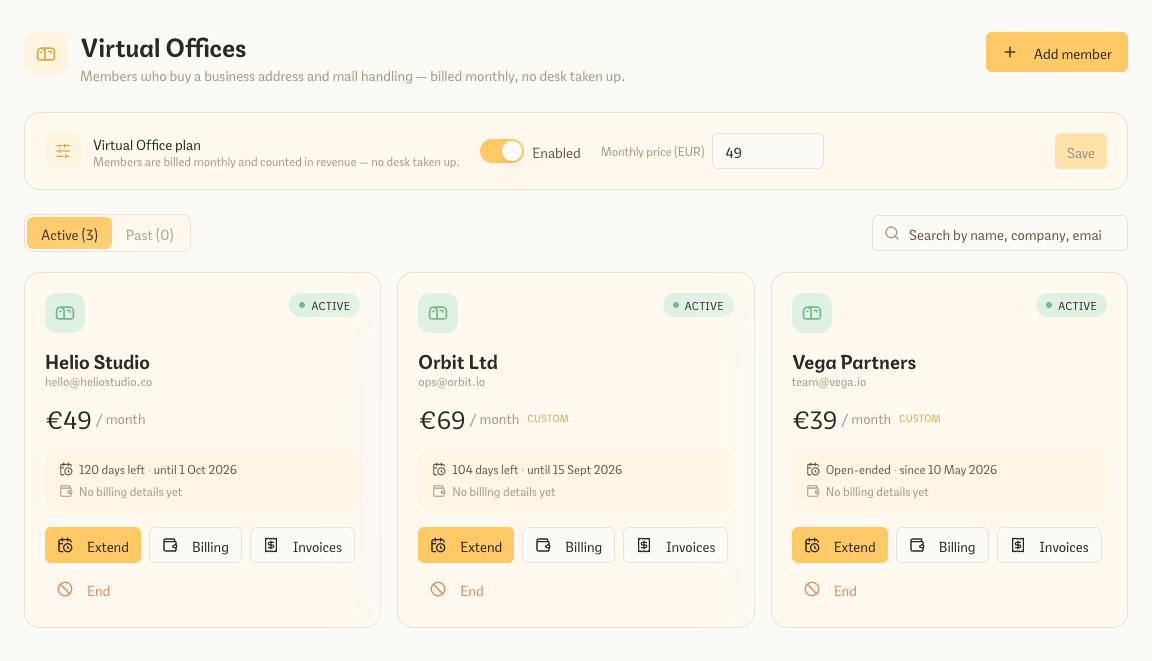
Plenty of operators sell more than desks: a registered business address, mail handling, somewhere to receive clients now and then. Virtual office plans track those members properly — and they get their own Virtual Offices page, right next to Private Offices, to manage at a glance. Turn the plan on and set a price from the page, activate it per member, then search, re-price, invoice, and renew without digging through your member list. Because a virtual office member never occupies a desk, their revenue lands in your reports while staying out of occupancy and demand math.
What you get
- A dedicated Virtual Offices page with Active and Past members in cards by default, or a compact list whenever you need to scan faster, plus search by name, company or email
- Open a member into the full-width overview drawer to see the exact plan, price, term, and billing address together, then jump straight to their full member record
- Per-member monthly price — override the plan default for a specific company
- Extend or end a period in place (with an open-ended option) and renew expired members in one step
- Edit billing and raise invoices from each member’s card; switch on auto-invoicing for hands-off monthly billing
- Fees count toward revenue but are excluded from desk occupancy and the calendar demand signal
- Imports cleanly from OfficeRnD — map the plan once and matching members activate automatically
Try every feature free for 3 months.
No credit card. Set up your space in under two minutes.
Start Free Trial