An AI operator that runs your space from chat
Message @OhMyDesk_bot on Telegram or open Ask AI in the web app in plain language and it both answers questions about your space and does the work — book or cancel a desk, mark a booking or invoice paid, freeze or reactivate a membership, record a payment, record an expense, add a lead or a member, let or vacate a private office, draft or email an invoice — by typing or by voice, with every change confirmed by a single tap before anything is saved.
Most coworking software hands you a dashboard to click through. OhMyDesk hands you an operator you can just talk to. The AI Operator Autopilot lives inside the @OhMyDesk_bot Telegram chat you already use for notifications: ask in text or send a voice note, in whatever language you speak. It reads your live data, never invents a number, and stages every action so nothing changes until you tap Confirm.
See it in action — a real booking in 4 messages
No forms, no menus — just type what you need. The bot finds availability, confirms the details, and logs the booking in seconds.
What you get
- Ask anything — who's in today, how many desks are free this week, revenue this month versus last, members whose plans are ending, leads that have gone cold
- Book a desk from one sentence — or just say 'the next free day' and it finds the first open working day for you
- Cancel a booking or mark one paid, by member name or desk, with a single Confirm tap
- Mark invoices as paid — reconcile invoices right from chat, automatically recording the payment in the ledger and confirming linked bookings with one tap
- Freeze or reactivate dedicated desk plans — pause a membership and bank unused days, or resume a member onto a free desk with one tap
- Log expenses on the go — state the amount, category, and date and save costs directly into your financial ledger with one tap
- Let or vacate a private office — and see your whole space at a glance: desks, meeting rooms, private offices and virtual offices
- Capture a lead the moment someone reaches out, with the right contact channel attached
- Draft an invoice for an existing member, a new member, or a one-off guest — saved as a draft on your Invoices page for you to review and send, or emailed to the member from chat (same email and PDF as the Send button) after you Confirm
- Record a payment — say "he paid cash" for a desk booking, a meeting-room booking or an invoice; it shows the open amount, method and date and saves only after Confirm
- Check a member's account in one answer — ask "has Anna paid everything?" to see plans, unpaid bookings, open invoices and balance
- Ask about a member's ledger and billing: "show Ana's ledger" or "did Ana pay twice?" lists open Charges with what is still open, payments of the last 90 days, open invoices and the balance, and flags payments that look like duplicates (Charges and the balance show when Advanced payment mode is on). It only reads: deleting a payment or refunding stays on Payments
- Ask which desk passes guests can buy online and why a pass is hidden: Ask AI, Telegram, Slack and MCP read your saved Booking page settings. Before it offers Confirm on an invoice payment, it checks the buyer and currency you gave it, and the payment confirmation links to the invoice. You can also mark a draft invoice sent without emailing it, and ask where to find the right Stripe keys
- Add a new member from chat, with one of your flex day packages if they bought one — it first checks the person is not already a member
- Speak instead of typing — Ask AI has a microphone and the Telegram bot understands voice notes. The words land in the text box so you can fix them before sending, and the Autopilot knows your members', desks' and rooms' names
- Ask AI in the web app opens with ⌘J or Ctrl+J, and on a computer you can drag the button and panel anywhere on the page
- Propose, then Confirm, on every change — nothing is saved until you tap the button, so a stray message can never alter your data
- A short follow-up such as a time or a desk number stays in the same conversation, instead of being read as a new request
- Grounded in your live data and scoped to your space only — it never makes a figure up and never sees another space
- Replies in your language — ask in English, Bulgarian, or whatever you type or say in a voice note
- No new app to learn — it's the same @OhMyDesk_bot, now two-way. Available on every plan, including the free trial
- Use Slack instead? If you connected Slack alerts, ask the Autopilot in the same Slack DM, with the same Confirm button before any change
- Prefer Claude or ChatGPT? Connect them to your space with the MCP server and use the same tools there
More things you can ask
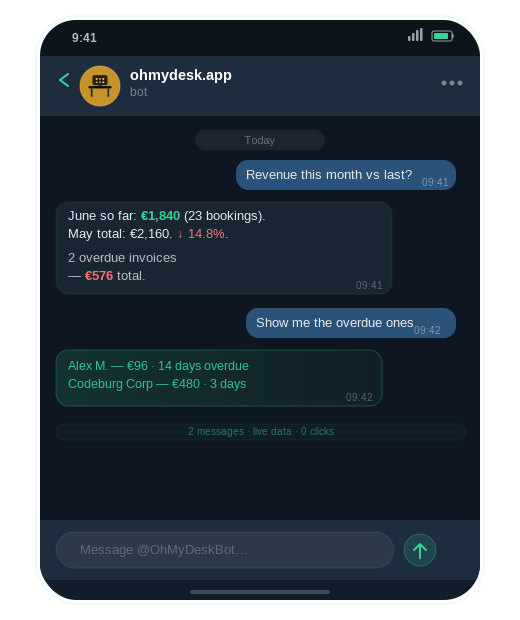
Revenue & invoices at a glance
Ask how this month compares to last, then drill straight into overdue invoices — no dashboard required.
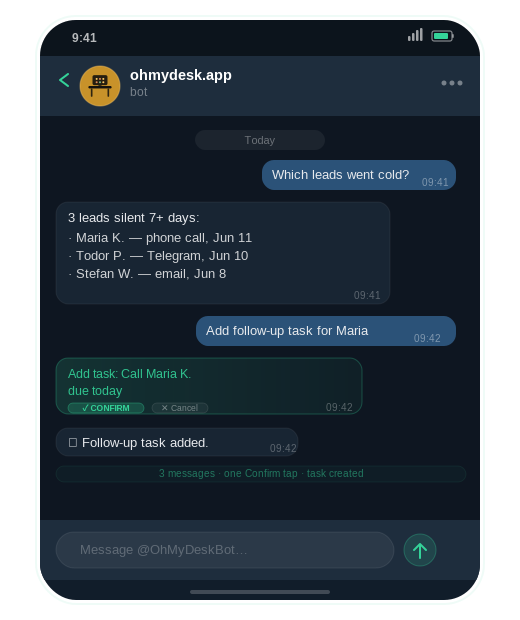
Never let a lead go cold
The bot surfaces leads that have gone silent and lets you add a follow-up task in one Confirm tap.
Frequently asked questions
- Which Telegram bot do I use?
- @OhMyDesk_bot — the same bot that already sends you booking notifications. On every plan it is two-way: you can ask questions and give commands, not just receive alerts.
- Can it book desks in any language?
- Yes. The AI understands plain English, Bulgarian, Russian, and most European languages. Reply to it in whatever language is most natural for you.
- What if I send an ambiguous message by accident?
- Nothing saves until you tap Confirm. Every action is staged and shown to you first — the bot always asks "who should I book it for?" or "which desk?" before committing anything.
- What can it actually do, besides booking?
- It can book, cancel, or mark a desk booking paid; mark invoices as paid; log expenses against your categories; let or vacate a private office; capture a new lead; draft an invoice for an existing member, a new member, or a one-off guest; freeze dedicated-desk memberships; top up meeting room hours; and answer any question about your live data — occupancy, revenue, upcoming checkouts, cold leads, members on expiring plans, and more. Payments are recorded only after you confirm the amount, method and date. A draft invoice can be emailed to the member from chat with the same email and PDF as the Send button, again only after Confirm.
- Can the Autopilot record payments and email invoices?
- Yes, for owners and admins. Tell it a desk booking, meeting-room booking or invoice was paid and it shows the open amount, method and date, then saves the payment only after you tap Confirm. It can also email a draft invoice to the member (the same email and PDF as the Send button) and add a new member. An invoice that was already sent is resent from Invoices.
- Can the Autopilot show a member's ledger or tell me if they paid twice?
- Yes, for owners and admins. Ask "show Ana's ledger", "did Ana pay twice?" or "which of her Charges are not invoiced?" in Ask AI or the Telegram bot. It lists the open Charges with what is still open, the payments of the last 90 days, open invoices and the balance, and flags payments that look like duplicates. Charges and the balance need Advanced payment mode (Settings → Billing & invoices); with it off, you still get the payments, open invoices and duplicate hints. It only reads: to delete a payment or refund, use Payments. To bill open Charges, it points you to Invoices → From charges so nothing is billed twice.
- Can I talk to the Autopilot instead of typing?
- Yes. Ask AI in the web app has a microphone next to send, and the Telegram bot accepts voice notes. In the web app your words land in the text box so you can correct them before you send. In Telegram the bot shows what it heard above a Confirm button.
- Is the Autopilot available on all plans?
- Yes. The AI Operator Autopilot is included on every plan, including Pro and the free trial, both in Telegram (@OhMyDesk_bot) and in the in-app Ask AI.
- Can I use Claude or ChatGPT instead of Telegram?
- Yes. OhMyDesk has a hosted MCP server, so owners and admins can connect Claude, ChatGPT, Claude Code or Cursor and use the same tools in those apps. See the MCP connector page for the steps.
- Does it see data from other spaces?
- No. The Autopilot is scoped strictly to your organisation. It can only read and write data in your workspace — it never has access to other tenants.
Try every feature free for 3 months.
No credit card. Set up your space in under two minutes.
Start Free Trial