Manager calendar sync: iCal feed for arrivals and departures
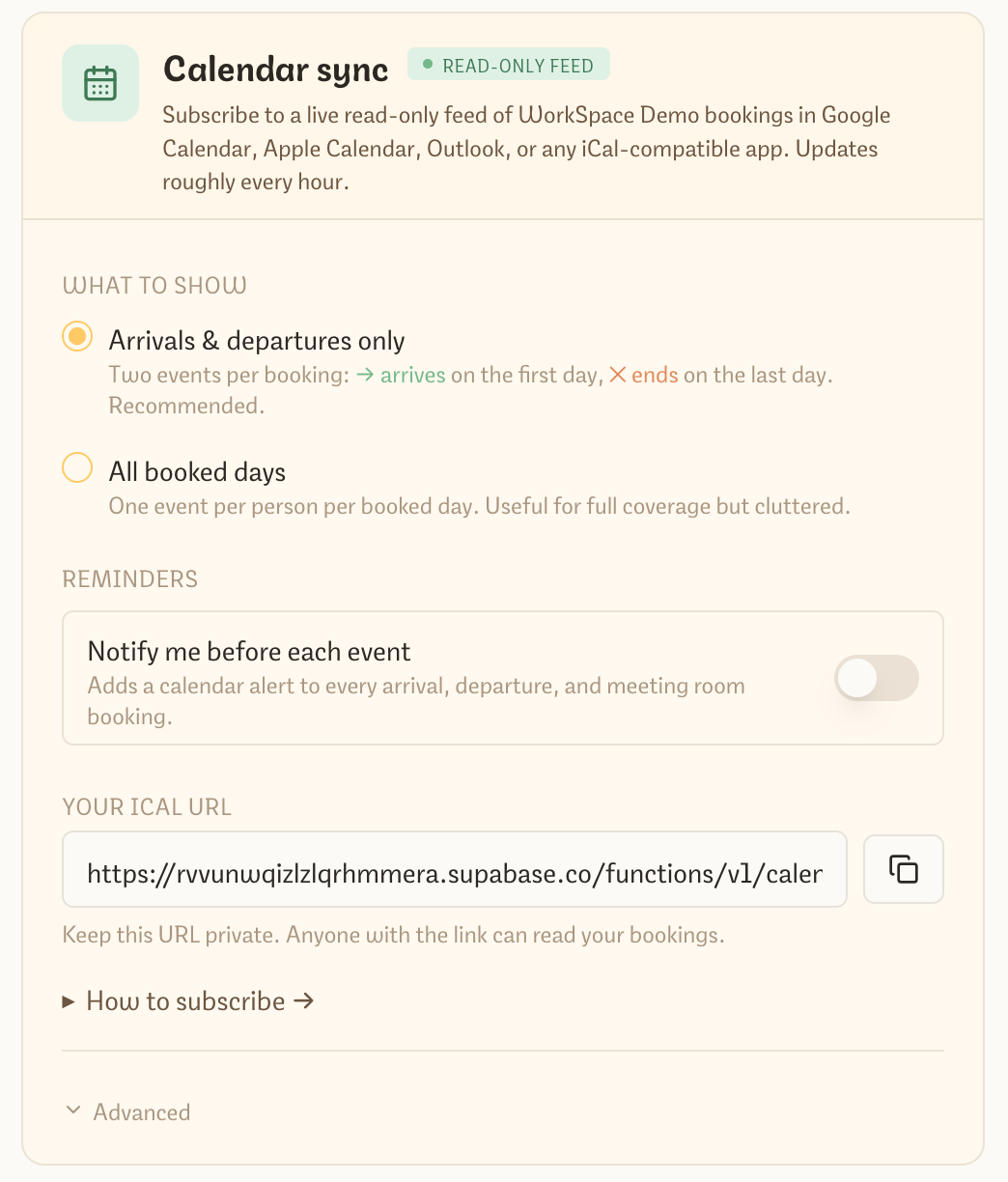
Copy one private iCal URL from Settings → Integrations and paste it into Google Calendar, Outlook, or Apple Calendar. Bookings stream in read-only. The default “arrivals & departures” mode marks real start and end days only — not every booked day of a monthly plan.
This feature is for operators who live in their personal calendar, not for members (they use the member portal or flex link). OhMyDesk ships iCal first because every major calendar app subscribes to a URL — no Google OAuth gate, no “connect your account” step that breaks for Outlook-only teams. The feed refreshes about hourly. Switch to “all booked days” if you want dense coverage; most 5–50 desk operators stay on arrivals and departures so May does not look like a barcode.
Who it’s for: Solo operators and small teams who juggle member renewals alongside personal meetings. If you only ever open the OhMyDesk calendar, you can skip this — it adds value when you need transition reminders in the app you already check on your phone.
What you get
- One private iCal URL per manager — paste into Google Calendar, click for one-tap Apple Calendar subscribe, or add as a web calendar in Outlook
- Compact titles ([ARRIVAL] - Anna Smith, [ENDS] - Ben) so the feed stays scannable in grid views; full details (full name, plan, desk, run dates) live in the event body
- Two modes: arrivals & departures only (default) shows the actual start and end of each plan period; all booked days mode provides full day-by-day coverage
- Events are marked transparent — they never block your free/busy availability for meeting invites
- Optional reminders: enable a notification 15 minutes to 2 days before each event with one toggle in Settings
- Token rotation in one click if the URL ever leaks
Frequently asked questions
- Does calendar sync write back to OhMyDesk or change bookings?
- No. The iCal feed is read-only. Editing or deleting an event in Google Calendar does not cancel a desk in OhMyDesk. Manage bookings in the OhMyDesk calendar, Autopilot, or the member portal.
- Why not Google Calendar OAuth two-way sync?
- OAuth blocks operators on Outlook or Apple-only workflows and adds a multi-week Google verification gate. iCal works everywhere with one URL. Two-way Google sync is on the roadmap when an operator asks for it; iCal covers the “see arrivals in my calendar” job today.
- What is the difference between arrivals & departures and all booked days?
- Arrivals & departures emits two markers per plan run — first day and last day — so renewal dates stand out. All booked days creates one event per occupied date, which can flood a month view when you have many dedicated members.
- How often does the feed update?
- OhMyDesk builds the feed fresh when a calendar app asks for it and suggests an hourly refresh. Each app polls on its own schedule: Apple and Outlook usually follow it, Google Calendar can take several hours.
- Is the feed URL secret?
- Treat it like a password. Anyone with the URL sees your bookings, including member names, plans and desks. Rotate the token in Settings → Integrations in one click if it leaks; old URLs stop working immediately.
Try every feature free for 3 months.
No credit card. Set up your space in under two minutes.
Start Free Trial